iOS
Swift Package Manager
- WebmasterID iOS SDK 1.3.0
- iOS 15.0 or later
- From a public Swift package on GitHub
Part of the HELPERG (opens in a new tab) Ecosystem
WebmasterID — Current productInstall a public SDK, pass each user's consent decision and send events. WebmasterID reports events, sessions, installations, retention and conversions for your iOS and Android apps, in the same workspace as your websites, and the reports state what they cannot answer.
Already a customer? Open the Apps reports or register an app under iOS apps or Android apps.
Install from the public package channel each platform already uses. No private repository, no access token, and no credential to add to your build server.
Swift Package Manager
Gradle, Kotlin or Java
pub.dev: webmasterid_flutter
React Native, Unity and .NET are not supported. The Flutter plugin covers iOS and Android apps, not Flutter web or desktop.
Every report counts by the time WebmasterID received an event, not by the device's clock, and the headline metrics carry their definitions on the page.
Events, sessions, active installations, first-observed installations and identified users, with events per day, the top events, and tracking health: when the last event arrived.
Every event name with its counts and sessions, the top screens and countries, and the 50 most recent events with shortened pseudonymous identifiers.
The funnel events your app reports in one table; purchases verified with Apple or Google in another. The two are never added together.
Day 1, 7 and 30 cohorts by installation, in your reporting time zone. A day that has not passed yet shows as not yet observable, never as 0%.
What is known about where app activity came from, and what is not. The SDKs send no source, campaign or referrer, so install sources show as unknown, never as organic.
A fixed vocabulary, so every app's reports mean the same thing. Events record the screen they happened on, where there is one. Custom event names and custom properties are not supported, and the app version, OS version and consent state are checked when an event arrives but not stored, so there is no breakdown by them.
One sign-in, one workspace, one plan. Filter by app, platform, environment and date range. Production is the default view; development and TestFlight builds stay out of it unless you choose them.

Teams that run a website and an app see both in one place, under one plan. The reports stay separate: WebmasterID does not merge a website visitor and an app user into one person.
Registering an app collects nothing. Events appear when the SDK is installed, started with the user's consent decision, sending events and delivering them.
Step 1
Create an account and choose Pro or Agency at checkout. App analytics is part of both.
Step 2
Under iOS apps or Android apps in the dashboard. You get a public property ID: safe to embed, not a secret, and not enough to collect anything on its own.
Step 3
From Swift Package Manager, the WebmasterID Maven repository or pub.dev. No private repository, account or access token.
Step 4
Initialize the SDK with the property ID and pass the user's decision. Until there is one, nothing is queued or sent.
Step 5
Screen views, taps and the funnel steps that matter to you. In Flutter, the plugin's lifecycle and navigator observers record app_open and screen_view for you.
Step 6
The SDK does it on its own, on iOS and Android: about 5 seconds after an event, when the app moves to the background, and after the next launch for anything left. flush() is only for a boundary your app chooses.
Step 7
Apps → Overview → Tracking health shows the last event received. If nothing arrives, the guide's verification steps and the SDK's diagnostics say why.
The installation guide covers each step for Flutter, Swift and Kotlin or Java, including the first run, verifying the integration and troubleshooting by symptom.
WebmasterID records what your app sends, under the decision your app passes. Whether consent is needed, and on which legal basis, is for you to decide; the SDK does not make an app compliant by itself.
No decision, no data
Until your app passes the user's decision, the SDK queues nothing and sends nothing.
Allowed
Events carry a session ID, an installation ID and, if your app calls identify(), an account key. Installation IDs and account keys are stored as keyed hashes: pseudonymous, not anonymous.
Restricted
Events carry a session ID only: no installation ID and no account key. This is reduced identification, not anonymity. The session ID, exact times and the country remain.
Disabled
Nothing is sent.
No advertising identifiers
The server refuses IDFA, IDFV, the Android advertising ID and other device identifiers. App Tracking Transparency is not requested, and an ATT answer is not consent to analytics.
No IP address stored
The country is taken from the network edge when an event arrives. No IP address or user agent is written.
Details in the installation guide: consent states, identifiers, and what the SDKs send for App Store privacy details and Google Play Data safety.
Your app can report a checkout. Only Apple or Google can confirm a purchase. The Conversions report keeps the two in separate tables and never adds them together.
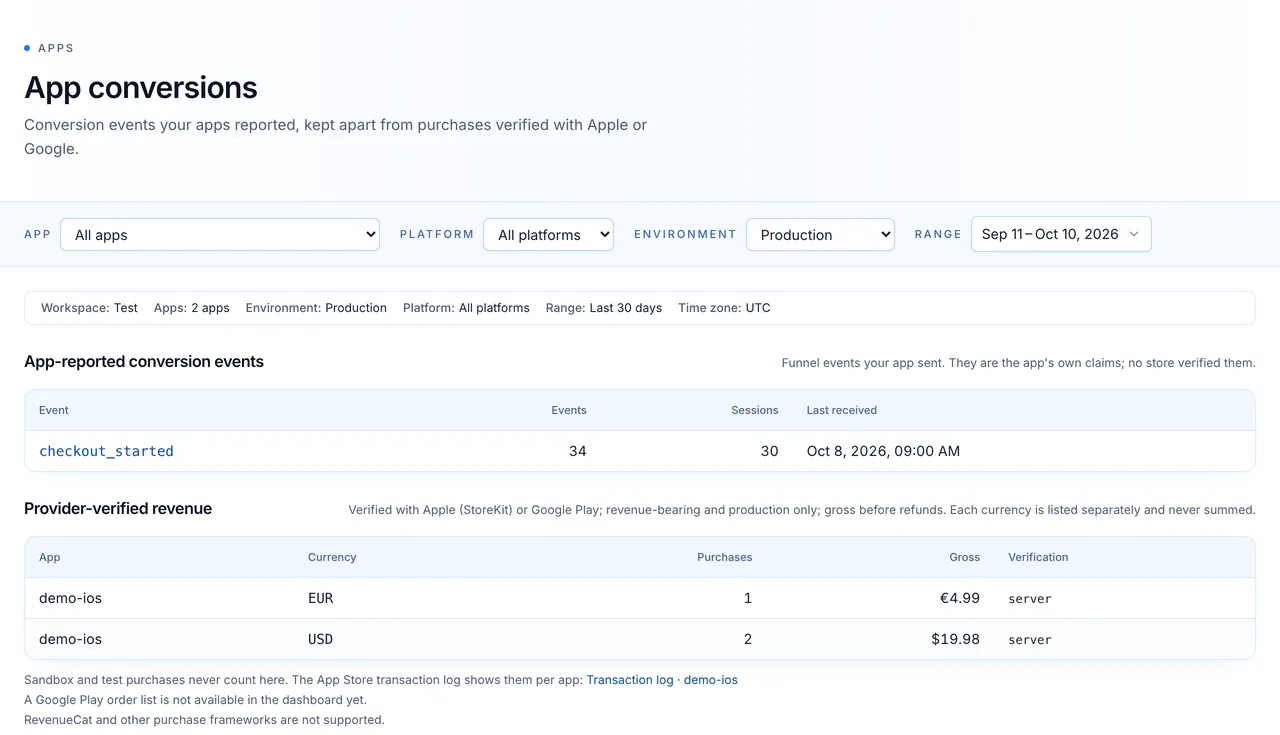
The funnel events your app sends, counted as its own claims:
On iOS, Apple-signed StoreKit 2 transactions, checked against Apple's certificates, and App Store Server Notifications. On Android, Google Play purchase tokens checked with Google, and real-time developer notifications. Each needs a store connection set up on the app's page in the dashboard. Production, revenue-bearing transactions only, gross before refunds, each currency separately. Sandbox and test purchases never count.
Where purchase verification stands
App Store notification delivery is verified in production. The Google Play side is deployed but not yet proven end to end with a test purchase, and no purchase has yet been carried through either store's sandbox and verified. RevenueCat and other purchase frameworks are not supported.
The SDK packages are public downloads. Sending events and reading the Apps reports needs an active plan. There is no free plan for new accounts.
$499 / month
One workspace with up to 5 connected sites, plus app analytics.
Start with Pro$1,199 / month
Multiple workspaces and team members, plus app analytics.
Start with AgencyBy agreement
Custom limits and onboarding, plus app analytics.
Contact salesMonthly billing in USD; cancel any time. Compare every plan. Already on a plan? App analytics is already in your workspace: register an iOS app or an Android app.
The guide for developers, the release notes, and the website side of WebmasterID.
Mobile SDK installation guide
From an empty project to the first event, on iOS and Android.
Read more →
Release notes: app analytics
What shipped: the public SDKs, the Apps reports and the guide.
Read more →
Privacy-first analytics
How the website tracker works without cookies or fingerprinting.
Read more →
Attribution analytics (websites)
Source attribution for website traffic, where referrers and UTM tags exist.
Read more →
Multi-site analytics
Workspaces and team members for agencies and portfolios.
Read more →
Pricing
Pro $499/month, Agency $1,199/month, Business by agreement.
Read more →